Visualizzazione post con etichetta Asus 1101HA. Mostra tutti i post

Welcome to the first Unofficial GMA 500 Driver Support website for Windows!
This project started in August 2012 when I thought,for the first time, that informations about this GPU were fragmentary and available on too many forums with too many pages!
So finally I decided to upload all into one blog  where people could find easily and quickly news and optimized drivers.
From that day over 200.000+ visitors, from all over the world, saw the first GMA 500 blog for Windows. Thank you!
In this website you can find also all you need to make your GMA 500 faster and INTEL ATOM Tips.
I talk about many things that you can read on older pages as how to: improve fsb; improve ram,video players,windows,web performance;ect ect. So it's better that you read all the blog before write a comment! (27 posts aren't too much).
The driver available here is programmed by Official Intel Embedded Team and fixed by me for a perfect fit on US15 platform (small form factor of US15W: GMA500 Devices).
Actually my release is compatible with various devices but not all cause it's not possible to determinate all displays configurations (All stuff posted is tested by my trusted device ASUS 1101HA)
All trademarks and\or logos contained in the website's sections belong to their owners.
For any copyright issues or advice don't hesitate to contact me using the appropriate button.
Project ended in 2021, some old link may not work or may return Google Gdrive error so leave a comment.

ITA.Questo sito nasce dalla voglia di rendere più facilmente reperibili informazioni e nuovi driver ottimizzati per la scheda video INTEL GMA 500.
Tutto il materiale postato su questo canale è completamente gratuito e testato dal mio fedele Asus 1101HA. Per tal Motivo non posso garantirne il corretto funzionamento su altri dispositivi nè mi assumo eventuali rischi per danni a cose o persone causati dall'uso improrio delle instruzioni contenute nelle varie guide.
Tutti i marchi e\o loghi,disegni ed immagini contenuti nelle sezioni appartengono ai rispettivi proprietari per eventuali problemi di copyright o consigli non esitate a conttattarmi tramite l'apposito pulsante.

If you like my work consider to:
  1. Share blog's link in other forums/social networks (this will help people to find this blog)
  2. Make a donation to offer me a coffee :)
  3. Share New Tips
  4. Click on small ads (disable your adsblocker)

Website's News

01/2024: DOWNLOAD Links are not working correctly...Mega Links ADDED!
09 Jan 2021 Optimus IEMGD (Win 7,8,8.1,10) freeware ALPHA is out!
12 Jan 2021:
-Windows 7 doesn't handle XDDM driver (xp release) backlight anymore, don't know what's wrong with Microsoft in these years(no problem with WDDM but it is another control). I will not check it, it's an obsolete soc to have a look at Microsoft documents.Probably needed acpi fix
-Intel deleted Official Xp and Vista driver web page...now only avaiable win 7 version (error or not?). Intel.com US support can't help for an EOS soc 😂 anyway still avaiable Emgd and OEM releases
-Uploaded again VBIOS patched,software and ASUS 1101ha rom patched in Optimus IEMGD post
-Backuped EMGD suite
-Retested Windows 10 2021 but nothing relevant, use windows 7 home premium 32bit or lite editions
That's all folks!
-18 June 2021 Changing Google Host with Microsoft hosting. Reason: Google uses generic antivirus that can mark as malware Microsoft Visual Studio Projects 😂 I love Google High Quality Service. Remember use only professional antivirus👍
 

DOWNLOAD

Codename
GMA 500
Architecture
PowerVR SGX535 (Serie SGX-5)
Pipelines
4 - unified
Core Speed *
200 MHz
Shader Speed
200 MHz
Memory
Until 1GB Shared
DirectX
DirectX 9.0c, Shader 3.0
Technology
65 nm
Features
OpenGL 2.0, PowerVR SGX Kern, Screen Tiling, Internal True Color Processing,Zero overhead AA, 32 Bit floating-point operations.
Date of Announcement
01.11.2008

Driver
Version
Date
Download
IEMGD 1.18
7/8*/8.1*/10*
8.14.1180.3398
Core 04/04/2013 Rev 2017
Official Intel 7/8*/8.1*/10*
8.14.10.2030
09/16/2010
IEMGD 1.18 XP/Vista*/7*
1.18.0.3398
Core 04/04/2013  Rev 2014
Official Intel XP/Vista*/7*
6.14.11.1018
12/03/2009
  N.A.
Official Intel Vista
7.14.10.1006
06/23/2009
  N.A.
Mesa3D - Wrappers
2.0
12/08/2017
Optimus IEMGD
7/8/8.1/10
1.2R Alpha
01/09/2021
 LINK
  *Compatibility Mode

->PLEASE, READ all blog's posts to avoid no sense questions<-
All drivers released are compiled for Atom Z5xx (US15) with official Intel CED downloadable: HERE
If you like these sources click on ads or think to donate. OFFICIAL GUIDE IEMGD Add-On: HERE


How to Install:
1)Download and UnRar package (for example with WinRAR)
2)Run IEMGD Add-on (in older release WindowsDriverSETUP.cmd or Setup.exe)
3)Select your display max resolution (only in IEMGD add-on) and follow installer instructions
Note. If any problem occurs with installer just try to install the driver manually via control pannel\device manager\Update video card driver
Tip: To Accelerate Setup Process,in IEMGD addon, check "Restart Automatically" Box, "OK" and Accept Unsigned Driver
Note. To Add HDMI Audio Support just Download from your online device support area the video driver package and extract the HDMI folder! Then you have two possibility: 
1)Try to force setup with IEMGD add-on (select your max resolution or external profile, select custom, import Video\Audio files) 
2)Install the files from Windows Device Manager.
Read Official Guide IEMGD add-on for more infos and How to install guide.

How to Uninstall:
Control Pannel\Programs and functions (older xp version can be uninstalled from WindowsDriverSetup.cmd)
Note.If any problem occurs with the driver, uninstall it via Windows Safe Mode to restore Microsoft Default Video Driver

FAQ  (Frequently asked questions)
Is my device compatible?
The Driver works only with (US15) Poulsbo Platform devices and stock Intel GMA500(200Mhz)
N.B.It doesn't work with GMA600 due to the different platform! (probably need some patch in sys path but anyway I don't have any device with this hardware so if you want can send me a laptop for testing)
Can be incompatible with some devices because many displays have different configurations.
This is an incomplete list of confirmed working devices in Win 7\8\8.1\10:

  • Auto Configuration works on: Acer AO751H -Asus 1101HA - Asus 1201HA -Archos 9 PC Tablet - Dell Mini 1010 - Kohjinsha SX3 -MSI U115 - Nokia Booklet 3G-Viliv S5, Sony Vaio P VGN-P720K , Sony VGN-P29VN_Q,  ect ect. 
  • Other Inf function: Sony Vaio X, Fujitsu U820- U2010 and Asus T91MT/T91
  • Tablets\netbooks\notebook that requires CUSTOM Mode Compiling in IEMGD Add-on:Probably some of Sony Devices
Thanks to:
-Vladimir for 1024x600 profile for Asus T91 Series
-Deman   for 1024x768 profile for FSL 979 Winpad

Got black screen with IEMGD or Strange colors view? This mean that common settings are not compatible.
Uninstall it from (options):
A)Control Panel (if Windows shows desktop)
B)Start Windows in Safe Mode -> Control Panel
C)Windows Recovery Console
D)If you have windows 8\8.1\10 with fast boot enabled: restart manually after the windows login with black screen for 3 times. At the next boot will appear Windows Tool\Go do advanced Setting and select Restart in Safe Mode
Try to fix the problem by your own self:
  • If there are different profiles, in IEMGD Add-on, for your display max resolution try another one
  • If you know your display panel settings use  IEMGD Add-On Custom mode to create a new profile for the driver (please share working profiles!) [MORE info in IEMGD Editor SECTION]
  • If you are not good at computer simple check on Google  for another custom package (Googling: EMGD for YOURDEVICE) than share with us that driver!
ITA.In alcuni pc il driver non funziona correttamente (windows si avvia con schermo nero,colori psichedelici o schermo tremante). Questo problema è causato dal file igdlh32.inf . Normalmente, il driver richiede le informazioni specifiche all'hardware ma se l'EDID (Extended Display Identification Data) non è completo (poco importa se la marca del pc asus,acer o altro questo parametro dipende dal display che durante la produzione è stato inserito) vengono utilizzati i settaggi alternativi presenti che non possono garantire il funzionamento corretto su tutti i monitor.
Come potete risolvere? 
1)cercate su Google, o altro motore di ricerca, un driver IEMGD compatibile per il vostro device. In giro ci sono molti Publisher e se volete condividete con noi il file igdlh32.inf contenuto nella cartella LPCO.
2)Sviluppate una configurazione funzionante tramite Intel CED o tramite IEMGD Add-On. Come si fa? Scaricate AIDA64,leggete l'ID del monitor e poi cercate su Internet il datasheet del pannello. All'interno del file digitale troverete tutte le informazioni richieste.

Difference between WinXP\7 vs Win7\8\10 drivers:
WinXP\Vista\7 driver respects XPDM (XP Driver model),supports DXVA 1.0 (DirectX Video Acceleration) and has a better software rendering while Win7\8\8.1\10 ,WDDM 1.1,driver has full support to DVXA 2.0 and a better hardware rendering(reduce CPU usage).
Under Win 7, usually, is better to use a WDDM driver.
Note.On Asus devices, if you use XP driver in Windows 7, have to install SHE FiX to restore Power Saving profile (Mega Link: Download ; Mirror3: Download)

Difference between IEMGD and Intel Default drivers:
  • Intel Embedded Media & Graphics Driver has more apps\games compatibility, bugfixes, OpenGL 2.0 support and it is directly setted for highest performace (about +20% vs stock driver). 
  • Small fixes were added to make it: light,stable with US15 Platform.Furthermore my Win 7/8/10 custom package includes: the WDDM (Windows Display Driver Model)  1.1 driver; IEMGD Add-On, a fast way to generate custom profiles; multidevices support; AutoSupport for Windows 8/8.1/10; Fixes/workaround for minor bugs like incompatible MS Performance Test, unworking Attribute button, Display detection, Brightness Level Control; a fixed uninstaller,remove all exept OpenGL that will be always enabled, also if you downgrade to official intel driver.
  • IEMGD doesn't support downscaling (ex. allows to set 1024x600@1024x768), DPST (Display Power Savings Technology Policy available only when on Battery), ALS(ADB = Automatic Display Brightness Policy available only when on battery in devices with ambient light sensor). Anyway there is no significant battery usage.
Difference between my driver package vs stock embedded driver:
Compiled to work with more devices without download an heavy suite,reduced package size and fixed some problem(really more easy to install it).

Which is the best O.S. for Intel GMA 500?
Microsoft Windows 7 home premium 32bit with some fixes (read Windows SpeedUP)
It's still the best compromise between overall performance and driver features
You can also install an entry level SSD and upgrade RAM to 2GB 800MHz and use Optimus IEMGD

Which is the latest DirectX available for Intel GMA 500?
Hardware support it until DX9c or DX9L but you may install newer package for bugfixes.
DX9L ,called also DX9Ex, is available only for Windows Vista and Win 10 (it doesn't bring benefits to GPU)

Is possible to play 1080p video with Intel GMA 500?
Yes, it is possible with correct video player (see this post) and correct video codec.
GPU supports hardware decoding for H264, MPEG 2/4, VC1, WMV9

Is necessary vBios for install this driver?
No, it isn't. The Driver works correctly also without Embedded vBios (Beta).
Embedded Video Bios isn't compatible with Intel Official GMA 500 Driver and doesn't bring any benifit.
Other Informations about compiling it are avaiable HERE and IEMGD Editor Section
This operation is not suggested on laptop.

What is Mesa3D - Wrapper Package?
Include Software OpenGL for all pc (MESA3d), Glide Wrapper (an old game library), DirectX Wrapper (to OpenGL for newer PC), a backup of stock IEMGD 1.18 Opengl library usable also for GMA600

How to install the MESA3D OpenGL Software Accelerated: This solution is suggested only on Windows 8.x and 10 because the OS doesn't support Hardware OpenGL rendering. Anyway this method has a slow rendering but you will able you to run applications that require OpenGL > 1.1 (Stock Windows). Use Optimus IEMGD (this method will not require any modification to your system) or download Mesa3D - Wrappers Package.
-Unrar it, rename Mesa3D opengl32.dll and overwrite igdogl32.dll in c:\windows\system32 folder.
Note.When your app requires only max OpenGl 1.1 rename c:\windows\system32\igdogl32.dll to, for ex, igdogl32disable.dll,or use Optimus IEMGD option, because Microsoft stock opengl has better performance.

Why Intel GMA 500 is so slow in 3D Graphic?
It is a little bit complicated to say but essentially for GPU low clock,architecture and mostly a not perfect Intel driver.
This kind of platform was develop as MID (Mobile Internet Device): Internet and Media that is exactly what our devices do!
GPU clock seems to be editable only on US15W platform and only before System startup (Read Overclock Section, straps)

Intel Graphics Tool problems?: Upgrading from Official Intel to Embedded Driver without Uninstall the first one causes a wrong copy. Solution: Uninstall the Driver ,Restart pc and reinstall IEMGD
How to use External Monitor Settings: (By Default is setted Clone Mode)
MID = Internal Monitor | Monitor = External Monitor
Single Display= Only a monitor will stay active when video cable is plug-in
Dual Display Clone = Both Monitors show the same Image at the same Resolution and Refresh Rate
Extended Desktop = Each Monitor shows an Image (can be the same if you copy it in extended desktop) and have a proper editable Resolution and Refresh Rate.
For ex. You can see a video1 in MID monitor and a video2 in external Monitor
How to apply Display Color Correction:
Usually this operation is not required by default. MS Windows includes displays tools but take really more time and the results are not so different from stock configuration.
Anyway for "normal" users, that want to try this feature, I suggest to use Intel Tool Utility.
Values are display linked so it's impossible to know which is the best configuration for your monitor.
Stock values are Gamma 1.0, Brightness 0 and Contrast 50
Check if editing color settings there is a better view (in my case I reduced only All Gamma value to 0.8)

Bugs Report:
 
Note.Seems that Microsoft removed backlight control for xp driver (tested under win7 and Vista), editing hw registry will not change level (no problem for now with WDDM driver) so probably check Microsoft bugfix cause acpi and soc drivers will not solve the problem.

Windows XP
Inverted Backlight Control by Fn button after hibernation or sleep-mode (Minor Bug)
VGA enabled only booting OS with video cable plugged-in (Minor Bug)
Without official Microsoft updates is impossible to install it on a fresh clean OS (Support EOS)
Windows 7
No Backlight Control by Fn button after hibernation or Suspension (restart the driver or Optimus IEMGD). Has reported from Microsoft is a bug with acpi state
VGA port enabled only running Intel Graphic Tool or pressing Win+P
Windows 8
Random BSoD: Really suggested to upgrade OS or  install Windows 7/8.1/10
No Backlight Control by Fn button after hibernation or Suspension (restart the driver or Optimus IEMGD). Has reported from Microsoft is a bug with acpi state
VGA port enabled only running Intel Graphic Tool or pressing Win+P
Few random glitches: Minor Bug 
OpenGL Hardware Accelerated is not SUPPORTED (use MESA Software OpenGL)
Recent App display may returns BSoD (disable this feature from Windows bar\properties)
Metro Video App, other Metro's Apps, Internet Explorer  don't use hardware acceleration
Windows 8.1
No Backlight Control by Fn button after hibernation or Suspension (use software controller or Optimus IEMGD). Has reported from Microsoft is a bug with acpi state
VGA port enabled only running Intel Graphic Tool or pressing Win+P
Few random glitches: Minor Bug 
OpenGL Hardware Accelerated is not SUPPORTED (use MESA Software OpenGL)
Recent App display may returns BSoD (disable this feature from Windows bar\properties)
Metro Video App, other Metro's Apps, Internet Explorer  don't use hardware acceleration
Windows 10
No Backlight Control by Fn button after hibernation or Suspension (use software controller or Optimus IEMGD). Has reported from Microsoft is a bug with acpi state
VGA port enabled only running Intel Graphic Tool or pressing Win+P
Few random glitches: Minor Bug 
OpenGL Hardware Accelerated is not SUPPORTED (use MESA Software OpenGL)
Recent App display may returns BSoD (disable this feature from Windows bar\properties)
Metro Video App, other Metro's Apps, Internet Explorer  don't use hardware acceleration
Common Tweaks:
- Install latest DirectX
- Enable Intel Hyper threading (read Windows SpeedUP)
- Set Paging file size  (read Windows SpeedUP)
- Install 2GB RAM (suggested Sodimm CL5 800MHz DDR2 price 20€, anyway aliexpress less 10€)
- Install an entry level SSD (20€) to speed up,a little, the OS (aliexpress less 15€)
- Install Video Codec Pack + Alternative Video Player
- Overclock your processor and use High Performance mode on Windows 7 settings (Optimus IEMGD)
- Use correct Web Browser
- Improve DPI if you have a small display with elevated pixel (better view)

THANKS TO TESTERS! Custom Support is ENDED (no more upgrades).
If you are getting problems with lastest revision, write a comment, try old builds or google for another custom driver and share with us your working configuration.

Windows 8/8.1/10 : OpenGL 2.0 Issue


Introduction: DirectX and OpenGL are competing application programming interfaces (APIs) which can be used in applications to render 2D and 3D computer graphics, taking advantage of hardware acceleration when available.
GMA500, with Intel Embedded Graphic Driver, can run both these two APIs: DirectX9.0C and OPENGL2.0 
Issue on Windows 8\8.1\10: IEMGD can't run OpenGL(Open Graphics Library) 2.0 API

Why? Seems to be an installer problem of all GPU Drivers(compiled for Windows 7) for a new Windows 8 Setting vs OpenGL ICD (Installable Client Driver)
In Our Case:
-C:\Windows\System32\opengl32.dll Microsoft Windows 8 OpenGL 1.1 INCLUDED and Enabled
-C:\Windows\System32\igdogl32.dll Intel Embedded Driver OpenGL 2.0 INCLUDED and Disabled
Solutions Tested but not working (maybe can resolve other GPU's equal issue):
-Update the Driver (not available for GMA500)
-Registry Fix: Added the same keys of Win7
-Installer INF Fix: Fixed to install with WIN 6.1=7; WIN 6.2=8; WIN 6.3=8.1
-Compatibility Mode: Tested Win 8-7-Vista SP2-XP SP3
-Manual Driver Mode from Device Manager
-HKLM\SYSTEM\CurrentControlSet\Control\Class\{4d36e968-e325-11ce-bfc1-08002be10318}\0000 Checked
-Comparison between INI for Win7 vs INI for Win8
-Edited by Hex Editor: returns OpenGL error! 
PROBABLY not Fixable on GMA500 ; for all other Intel GMA GPUs just download updated driver or open inf file and edit strings for win 7 (NTx86.6.1) for ex:
 [Manufacturer]
%Intel%   = Intel.Mfg,NTx86.6.1
[Intel.Mfg.NTx86.6.1]
Change it to accept all OS versions(example above) or you can edit NTx86.6.1 to support only 6.2(win 8)/6.3(win 8.1):
[Manufacturer]
%Intel%   = Intel.Mfg
[Intel.Mfg]
Fixed Installer for Intel HD 1°gen and Intel Series 4 (not gma500) can be find HERE
Contacted: Microsoft,Intel,Asus,OpenGl,Forums...all saying it's an Intel issue! I hate this way to operate
Intel aswered that GMA500 is "EOL" (End of Life Support) so never will be available a solution from them!
P.S.For x64 OS is necessary disable Drive Digital Firm Check
Solutions still not Tested
Make a digital firm for developer
How to Install MESA3D Software Accelerated OpenGL on Windows 7/8/8.1 (probably also XP)
After many tests,research on MSDN and registry fixes,I understood that the error is ,in our unlucky case, in igdogl32.dll. Reverse isn't possible so We can't get OpenGL Hardware Accelerated!
The Only Workaround to play apps\games that requires OpenGL > vers 1.1 is to change Windows Software accelerated Opengl32.dll.
N.B. Performance are Poor (will not fixed with future releases so i will not update this package)
WORKS ON ALL PCs not only GMA500 Devices!
Options: 1) MESA3D OpenGL (described and free) 2) TitaniumGL (Trial version and only OpenGL1.4)

Instructions:
1)Go to Download Section and download Mesa 3D - Wrappers Package (contains MESA3D Software Acc OpenGL Dic 2017)
2)Follow instructions: (three possible solutions)
-First Option,suggested, put opengl32.dll directly in game\app folder (may not work)
-Second Option for GMA500 rename package opengl32.dll to igdogl32.dll and put it in system32 (overwrite existing unworking dll)
-Third Option overwrite C:\Windows\System32\Opengl32.dll with MESA dll as described above: (if your video driver has no opengl file)

A.Make a backup of Windows OpenGL to restore it in the future 
B. Go to system32\opengl32.dll file, right click properties. Click on Security tab\Modify\Select "Users" Profile and check Full Control then OK->OK
C.Overwrite system32\opengl32.dll with mesa dll (32bit or 64bit dipends from your OS)
  

ASUS Suite All-in-One: ATK - SHE - Mouse Driver for Windows 7\8\8.1\10

.::GMA500Booster.blogspot.com::.
Asus Driver Suite is a new installer for Asus devices without official support for newer OS.
Include all files Windows 7\8\8.1\10 compatible for Asus devices:
  • Asus Hotkeys (6.1.1.2021) [Enable Fn buttons]
  • Asus SHE (2.16) [Enable Overclock]
  • Touchpad Driver (17.0.19) [Optional for Synaptics]
If you want to update this package simply overwrite files with updated Mouse Driver in Driver\Synaptics folder. ++Thanks to user SdL for XP ACPI Tip!++

                     
ASUS Suite Installer
THIS METHOD should Work an all Asus Devices producted in 2009-2010.
If you notice bugs Report it! (Tested on 1101HA and 1000HE)
WORKS Under: Windows 7 - 8 - 8.1 - 10

Last Version 1.1 Final: DOWNLOAD - Mirror2: DOWNLOAD - Mega Link: DOWNLOAD

[Hot to Install] NOTE: ALWAYS Uninstall Suite and Restart PC before upgrade it!
1)Run Asus Suite.exe


2) Select "Install on Windows 7/8/8.1" and Click Install/Uninstall button


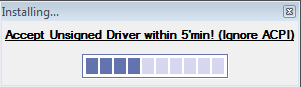
3)Accept Warnings within 4'minutes (if not setup will not works correctly!)


4)Wait (about 5'min): Ignore ACPI Error (don't waste your time clicking OK). 
Program will say "Setup 100% Complete" and show "Remember to Restart" button 


5)Restart PC
6)UnCheck and Confirm  popups. The END!

______________________________________________________________________________
NB. ASUS SHE WORKS only with Bios RAM compatible; if you haven't it read tweak in OVERCLOCK RAM Section!
Why so many warnings?
This program is 100% Ads,Malwares free! Warnings appear because Asus's Digital firm is expiried and because Synaptics OEM Package was modified to reduce size (original,with a lot of useless files, is 110MB)

[BugReport and Solutions]
-Asus 1101HA: SHE Overclock Windows 8 crash issue-> Leave always "Super Performance Mode", OS will auto downclock your CPU when power isn't necessary [Not fixable] FIXED with November 2014 Updates
-Asus 1000HE: No Touchpad Driver Installed->Uninstall Synaptics Driver and download from HERE Macrovision ETD Touchpad Driver for Win 7 (Not a Bug! It doesn't support Synaptics)
[Tweaks]
Asus Suite is a dynamic installer that can be edited:
-Update Synpatics TouchPad driver: put new files in driver\synpatics folder
-Disable touchpad tray icon directly from installer: add to driver\reg.reg this line [HKEY_CURRENT_USER\Software\Synaptics\SynTPEnh]
"TrayIcon"=dword:00000021
-Try to support Windows XP: Just Replace driver\HotkeyService.exe and SuperHybridEngine.exe with XP versions; add to driver\reg.reg this line for autorun
[HKEY_LOCAL_MACHINE\SOFTWARE\Microsoft\Windows\CurrentVersion\Run]
"ATK"="C:\\Program Files\\EeePC\\ATK.exe"

Suggestion:
-Disabled Synaptics Autorun (if you select normal setup): a trayicon isn't so usefull (you can still edit settings from control panel) and disabling service you can preserve about 5% of CPU power (important for low power pc). You can disable it from windows scheduler

[ChangeLog 1.1 Final 2014]
*Added Profile "Install without Mouse Driver" for Devices uncompatible with Synaptics
*Added optional AutoRun only for Asus Hotkeys (disable she)
[ChangeLog 1.1 RC1]
*Updated SHE (from 2.09 to 2.16)
*Restored Synaptics trayicon
*UAC Fixed Problem with AutoRun
*Updated Touchpad Driver (from 16.x to 17.x)
*Removed "Compatibility Mode" Step
*Fixed Astray autorun in 1000HE
*Optimized Code & New User Graphic Interface
*Reduced Package Size (from 11MB to 10MB)
[ChangeLog 1.09 RC2]
*Added Support for Windows 7
*Initial Support for UAC
*Removed ACPI Step
*SHE 2.09 [Max frequency depends by SHE BIOS Option (SHE 30%= 1.74GHz)]
*Asus Hotkeys 6.1.1.2021: Fn Button Enabled
*TouchPad Driver:
-Removed 64bit support
-Removed Examples and Tutorial
-Fixed INI installer
-Removed TEST app
-Removed Language Pack
_________________________________________________________________________
Note. This solution isn't working on your device? No problem: Report and try alone!
-Go on Asus Support\select your device: Download ACPI or ATK or KBfilter for XP
-Download also SHE and Hotkeys for Win 7
-Install Driver for Win 7 on Win 8.x they should not work: from C:\program files\ EeePc or Asus folder copy: Hotkeyservice.exe and SuperHybridengine.exe to the desktop
-Unistall Driver for Win 7 and Restart
-Install ACPI or ATK or KBfilter for XP
-Try if hotkeyservevice and superhybridengine, in your desktop, work!

Windows 8.1 PRO Update1 : Intel Atom Z520 (April 2014)

-Processor: 1 gigahertz (GHz) o better with  PAE, NX and SSE2 support
-RAM: 1 GB (32 bit) or 2 GB (64 bit) [I suggest to install 32bit version only with  2GB on Atom devices]
-Free Space: 16 GB (32 bit) or 20 GB (64 bit)
-Graphic Card: Microsoft DirectX 9 with WDDM driver

Note.Windows Xp system minimum requirements (Pentium 233 MHz, 64 MB RAM, 1,5 GB hardisk;VGA 800 x 600)

Starting Tweaks: (read HERE)
-Hyper Threading
-No paging file
-Small taskbar buttons
-Go to desktop instead of start (when loading)
-Start show apps directly (when use metro)
-Disabled UAC and SmartScreen (useful only for a "foolish user")
-Classic Shell (close metro\moder UI for a classic win7 experience)
-Remove all password requests from login

Removing Login: Right Click on Start Icon\Run (or Win+R) then insert "netplwiz":
Settings\change PC settings\Accounts\Sign-in Options:

Comments:
Metro Ui  Speed with GMA500 and Z520@1.33Ghz VOTE: 5.5 ->lag between first screen and Apps section (probably will be released some patch to make it quicker)
BSoD observed with: "When I point  to the upper-left corner, switch between my recent apps"
(ITA Passa da un' app recente all'altra quando si fa click sull'angolo sinistro).


  • Keyboard Commands
Win+F1  Help
Win+F3/W/Q/S/F Search
Win+Pause System
Win+1/2/3/ects Run first/second/ect. icon in taskbar
Win+ "+"  Zoom in
Win+P Project to a connected screen
Win+I Settings
Win+U Ease of Access Center
Win+T select a taskbar icon
Win+R Run
Win+E This PC (ex Local)
Win+D Minimize Program
Win+H Share
Win+K Devices
Win+L Lockscreen (with password)
Win+ "." Select Multidesktop
Win+"-" Zoom out
Win+B Select a tray icon
Win+C Smart menu or Charm Menu
Win+X  Right click on Start icon
Win+Enter Run Narrator (text reader)

  • Mouse Commands
Right side of the screen: Smart Menu
Right click on Start Icon: Context menu
Left down corner Start Icon
Left high corner Multitasking viewer(after it show an image go down to left side screen It will open a complete Multitasking menu
Upside of the screen Resize windows (metro GUI)
Do you know other Keys\mouse combinations?


Conclusion  test:
  1. Suspension-Hibernation works correctly
  2. My package Asus Drivers Suite (SHE and Hotkeys Service) works perfectly
  3. Metro GUI  is faster removing\unpin some icon and effects
  4. Graphic problems with GAMES on Opengl and Directx (IEMGD 1.18 problem)
  5. Ram usage  about 500MB in idle 5' min (with Z5xx series use only 2GB 800Mhz CL5)
  6. Windows adjust directly Intel Multipler range:  x10 - x6 (depends from CPU load :1.33MHz to 798Mhz)
  7. Classic Shell,an opensource program, can eliminate Metro\Modern UI and restore Win7 experience (note: Start icon is editable)
  8. Windows Market has many apps and games (probably someone will works with GMA500)
  9. MediaPlayer Classic works correctly (no problems with fullhd or HD video like win7)
  10. OpenGL 2.0 isn't working (also in Windows 8 Preview,Windows 8, Windows 8.1 Preview)
  11. Startup is faster then older MS OSs (removed Safe Menu from boot)
-Ram Usage in idle after 5 min: about 500MB with IEMGD 1.18 (I'm not still satisfied)
-Left Upper Corner (Recent App): Disabled by Default (before update 1 it caused BSoD)
-Restarting the PC: causes BSoD (Fixed in 2016 package. Not still available)
-Apps loading still some graphic errors: Minor bug (only for 2 seconds)
-Metro Apps doesn't use Hardware acceleration (video app is too low using CPU decoding on Z520)
-System is faster than Windows 7
-IEMGD OpenGL Hardware Accelerated doesn't work on Win 8 (use MESA3D opengl in Download section: them are software accelerated = SLOW in Atom Z520)
-Internet Explorer use wrongly the adobe hardware acceleration (use it for rendering and not for decoding)
-Update1 brings about 10% of optimization so better than Win 8.1
-Probably better performance on 1024x768 display or less on Metro (my panel is 1366x768)
-Windows 7 seems to have a better Adobe Flash Player speed (see section Browser-Adobe flash player)
[TEST Video]: Adele - Set Fire to the Rain (Live to the Royal Albert Hall) + Opera Browser 12.16
-ATOM Z520 1.33GHz 1366x768 display-
HD Large Window: 12 FPS
HD Normal Window: 13 FPS
480p Fullscreen: 13 FPS
480p Large window: 16 FPS 
480p Normal window 17 FPS
360p Fullscreen: 18 FPS
360p Large Window: 22 FPS
360p Normal Window: >24 FPS

ASUS SHE fixed for Z5xx devices compatible with Win 8\8.1 is available HERE
NOTE.After only 12 years, Microsoft XP Support is closed! No more Security Updates will come from Windows Update so Users start thinking to migrate to a newer OS or use a really good Firewall\Antivirus (it isn't the best choice).