Visualizzazione post con etichetta working. Mostra tutti i post

Welcome to the first Unofficial GMA 500 Driver Support website for Windows!
This project started in August 2012 when I thought,for the first time, that informations about this GPU were fragmentary and available on too many forums with too many pages!
So finally I decided to upload all into one blog  where people could find easily and quickly news and optimized drivers.
From that day over 200.000+ visitors, from all over the world, saw the first GMA 500 blog for Windows. Thank you!
In this website you can find also all you need to make your GMA 500 faster and INTEL ATOM Tips.
I talk about many things that you can read on older pages as how to: improve fsb; improve ram,video players,windows,web performance;ect ect. So it's better that you read all the blog before write a comment! (27 posts aren't too much).
The driver available here is programmed by Official Intel Embedded Team and fixed by me for a perfect fit on US15 platform (small form factor of US15W: GMA500 Devices).
Actually my release is compatible with various devices but not all cause it's not possible to determinate all displays configurations (All stuff posted is tested by my trusted device ASUS 1101HA)
All trademarks and\or logos contained in the website's sections belong to their owners.
For any copyright issues or advice don't hesitate to contact me using the appropriate button.
Project ended in 2021, some old link may not work or may return Google Gdrive error so leave a comment.

ITA.Questo sito nasce dalla voglia di rendere più facilmente reperibili informazioni e nuovi driver ottimizzati per la scheda video INTEL GMA 500.
Tutto il materiale postato su questo canale è completamente gratuito e testato dal mio fedele Asus 1101HA. Per tal Motivo non posso garantirne il corretto funzionamento su altri dispositivi nè mi assumo eventuali rischi per danni a cose o persone causati dall'uso improrio delle instruzioni contenute nelle varie guide.
Tutti i marchi e\o loghi,disegni ed immagini contenuti nelle sezioni appartengono ai rispettivi proprietari per eventuali problemi di copyright o consigli non esitate a conttattarmi tramite l'apposito pulsante.

If you like my work consider to:
  1. Share blog's link in other forums/social networks (this will help people to find this blog)
  2. Make a donation to offer me a coffee :)
  3. Share New Tips
  4. Click on small ads (disable your adsblocker)

Website's News

01/2024: DOWNLOAD Links are not working correctly...Mega Links ADDED!
09 Jan 2021 Optimus IEMGD (Win 7,8,8.1,10) freeware ALPHA is out!
12 Jan 2021:
-Windows 7 doesn't handle XDDM driver (xp release) backlight anymore, don't know what's wrong with Microsoft in these years(no problem with WDDM but it is another control). I will not check it, it's an obsolete soc to have a look at Microsoft documents.Probably needed acpi fix
-Intel deleted Official Xp and Vista driver web page...now only avaiable win 7 version (error or not?). Intel.com US support can't help for an EOS soc 😂 anyway still avaiable Emgd and OEM releases
-Uploaded again VBIOS patched,software and ASUS 1101ha rom patched in Optimus IEMGD post
-Backuped EMGD suite
-Retested Windows 10 2021 but nothing relevant, use windows 7 home premium 32bit or lite editions
That's all folks!
-18 June 2021 Changing Google Host with Microsoft hosting. Reason: Google uses generic antivirus that can mark as malware Microsoft Visual Studio Projects 😂 I love Google High Quality Service. Remember use only professional antivirus👍
 

ASUS Suite All-in-One: ATK - SHE - Mouse Driver for Windows 7\8\8.1\10

.::GMA500Booster.blogspot.com::.
Asus Driver Suite is a new installer for Asus devices without official support for newer OS.
Include all files Windows 7\8\8.1\10 compatible for Asus devices:
  • Asus Hotkeys (6.1.1.2021) [Enable Fn buttons]
  • Asus SHE (2.16) [Enable Overclock]
  • Touchpad Driver (17.0.19) [Optional for Synaptics]
If you want to update this package simply overwrite files with updated Mouse Driver in Driver\Synaptics folder. ++Thanks to user SdL for XP ACPI Tip!++

                     
ASUS Suite Installer
THIS METHOD should Work an all Asus Devices producted in 2009-2010.
If you notice bugs Report it! (Tested on 1101HA and 1000HE)
WORKS Under: Windows 7 - 8 - 8.1 - 10

Last Version 1.1 Final: DOWNLOAD - Mirror2: DOWNLOAD - Mega Link: DOWNLOAD

[Hot to Install] NOTE: ALWAYS Uninstall Suite and Restart PC before upgrade it!
1)Run Asus Suite.exe


2) Select "Install on Windows 7/8/8.1" and Click Install/Uninstall button


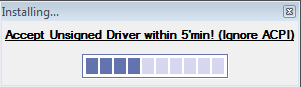
3)Accept Warnings within 4'minutes (if not setup will not works correctly!)


4)Wait (about 5'min): Ignore ACPI Error (don't waste your time clicking OK). 
Program will say "Setup 100% Complete" and show "Remember to Restart" button 


5)Restart PC
6)UnCheck and Confirm  popups. The END!

______________________________________________________________________________
NB. ASUS SHE WORKS only with Bios RAM compatible; if you haven't it read tweak in OVERCLOCK RAM Section!
Why so many warnings?
This program is 100% Ads,Malwares free! Warnings appear because Asus's Digital firm is expiried and because Synaptics OEM Package was modified to reduce size (original,with a lot of useless files, is 110MB)

[BugReport and Solutions]
-Asus 1101HA: SHE Overclock Windows 8 crash issue-> Leave always "Super Performance Mode", OS will auto downclock your CPU when power isn't necessary [Not fixable] FIXED with November 2014 Updates
-Asus 1000HE: No Touchpad Driver Installed->Uninstall Synaptics Driver and download from HERE Macrovision ETD Touchpad Driver for Win 7 (Not a Bug! It doesn't support Synaptics)
[Tweaks]
Asus Suite is a dynamic installer that can be edited:
-Update Synpatics TouchPad driver: put new files in driver\synpatics folder
-Disable touchpad tray icon directly from installer: add to driver\reg.reg this line [HKEY_CURRENT_USER\Software\Synaptics\SynTPEnh]
"TrayIcon"=dword:00000021
-Try to support Windows XP: Just Replace driver\HotkeyService.exe and SuperHybridEngine.exe with XP versions; add to driver\reg.reg this line for autorun
[HKEY_LOCAL_MACHINE\SOFTWARE\Microsoft\Windows\CurrentVersion\Run]
"ATK"="C:\\Program Files\\EeePC\\ATK.exe"

Suggestion:
-Disabled Synaptics Autorun (if you select normal setup): a trayicon isn't so usefull (you can still edit settings from control panel) and disabling service you can preserve about 5% of CPU power (important for low power pc). You can disable it from windows scheduler

[ChangeLog 1.1 Final 2014]
*Added Profile "Install without Mouse Driver" for Devices uncompatible with Synaptics
*Added optional AutoRun only for Asus Hotkeys (disable she)
[ChangeLog 1.1 RC1]
*Updated SHE (from 2.09 to 2.16)
*Restored Synaptics trayicon
*UAC Fixed Problem with AutoRun
*Updated Touchpad Driver (from 16.x to 17.x)
*Removed "Compatibility Mode" Step
*Fixed Astray autorun in 1000HE
*Optimized Code & New User Graphic Interface
*Reduced Package Size (from 11MB to 10MB)
[ChangeLog 1.09 RC2]
*Added Support for Windows 7
*Initial Support for UAC
*Removed ACPI Step
*SHE 2.09 [Max frequency depends by SHE BIOS Option (SHE 30%= 1.74GHz)]
*Asus Hotkeys 6.1.1.2021: Fn Button Enabled
*TouchPad Driver:
-Removed 64bit support
-Removed Examples and Tutorial
-Fixed INI installer
-Removed TEST app
-Removed Language Pack
_________________________________________________________________________
Note. This solution isn't working on your device? No problem: Report and try alone!
-Go on Asus Support\select your device: Download ACPI or ATK or KBfilter for XP
-Download also SHE and Hotkeys for Win 7
-Install Driver for Win 7 on Win 8.x they should not work: from C:\program files\ EeePc or Asus folder copy: Hotkeyservice.exe and SuperHybridengine.exe to the desktop
-Unistall Driver for Win 7 and Restart
-Install ACPI or ATK or KBfilter for XP
-Try if hotkeyservevice and superhybridengine, in your desktop, work!